顯示具有 05160593_余杰恩 標籤的文章。 顯示所有文章

2018年12月20日 星期四

week 15 JN

自行測試搖桿

arduino 程式

void setup(){
    Serial.begin(9600);
}
void loop(){
    int val=analogRead(A0);
    Serial.write(val/8);
    delay(50);
  }


processing 程式

import processing.serial.*;

Serial myPort;
void setup(){
  size(512,512);
  myPort = new Serial(this,"COM7",9600);
}
float userX=256 , userVX=0;
void draw(){
  background(255);
  if(myPort.available()>0){
    int val = myPort.read();
    userVX = (val-63)/20.0;
    println(val);
  }
  userX+=userVX;
  ellipse(userX,400,100,100);
}

2018年12月13日 星期四

week 14 JN


打開範例,
------------------------------------------------------------------------------------------------------------------------
這個程式碼可以讓我們轉動的時候音調會降低或升高


2018年12月6日 星期四

WEEK 13 jn

WEEK13 互動技術概論

首先先去processing找範例程式
接著再複製最下方的程式碼到arduino
並且改一些程式碼 
int switchPin = 4;                       // Switch connected to pin 4

void setup() {  ///改成2.因為MakerUNO的按鈕在PIN 2
  pinMode(switchPin, INPUT); // Set pin 0 as an input
  pinMode(2,INPUT_PULLUP);
  Serial.begin(9600);                    // Start serial communication at 9600 bps
}

void loop() {
  if (digitalRead(2) == HIGH) {  // If switch is ON,
    Serial.write(1);               // send 1 to Processing
  } else {                               // If the switch is not ON,
    Serial.write(0);               // send 0 to Processing
  }
  delay(100);                            // Wait 100 milliseconds
}

2018年11月22日 星期四

week8_焦焦焦

Week 8 期中作品分享

組員 : 05161216焦奕維,05160593余杰恩

作品名稱 : 皮卡丘打排球

作品連結 : https://www.youtube.com/watch?v=dgIgAkyiILE

遊戲玩法 : 用皮卡丘頂排球,不要讓排球掉下來,鍵盤左右移動位置。

week 11 JN

燈光連續閃爍

void setup() {
  // put your setup code here, to run once:
  for(int i=2 ; i<=13 ;i++){
      pinMode(i,OUTPUT);
    }
}

void loop() {

  for(int i=2 ; i<13 ; i++){
      digitalWrite(i , HIGH);
      delay(300);                                                                                                                                                                                                                                                                                                                                                                                                                                                                                                                                                                                                                 
    }
    for(int i=2 ; i<=13 ; i++){
        digitalWrite(i,LOW);
      }


小星星

int piezoPin = 8;
int length = 15;
char notes[] = "ccggaag ffeeddc ggffeed ggffeed ccggaag ffeeddc ";      // a space represents a rest
int beats[] = { 1, 1, 1, 1, 1, 1, 2, 1, 1, 1, 1, 1, 1, 2, 4 };
int tempo = 300;

void playTone(int tone, int duration)
{
  for (long i = 0; i < duration * 1000L; i += tone * 2)
  {
    digitalWrite(piezoPin, HIGH);
    delayMicroseconds(tone);
    digitalWrite(piezoPin, LOW);
    delayMicroseconds(tone);
  }
}

void playNote(char note, int duration)
{
  char names[] = { 'c', 'd', 'e', 'f', 'g', 'a', 'b', 'C' };
  int tones[] = { 1915, 1700, 1519, 1432, 1275, 1136, 1014, 956 };
  for (int i = 0; i < 8; i++)
  {
    if (names[i] == note)
    {
      playTone(tones[i], duration);
    }
  }
}

void setup()
{
  pinMode(piezoPin, OUTPUT);
}

void loop()
{
  for (int i = 0; i < length; i++)
  {
    if (notes[i] == ' ')
    {
      delay(beats[i] * tempo);
    } else
      playNote(notes[i], beats[i] * tempo);
    delay(tempo / 2);
  }
}

音符跟著燈一起閃爍

int piezoPin = 8;

int length = 15;

char notes[] = "ccggaag ffeeddc ggffeed ggffeed ccggaag ffeeddc ";      // a space represents a rest

int beats[] = { 1, 1, 1, 1, 1, 1, 2, 1, 1, 1, 1, 1, 1, 2, 4 };

int tempo = 300;


void playTone(int tone, int duration)

{

  for (long i = 0; i < duration * 1000L; i += tone * 2)

  {

    digitalWrite(piezoPin, HIGH);

    delayMicroseconds(tone);

    digitalWrite(piezoPin, LOW);

    delayMicroseconds(tone);

  }

}


void playNote(char note, int duration)

{
  int LED[]= {3, 4, 5, 6, 7, 9, 10, 11};   ///老師寫的第一行 是陣列
  char names[] = { 'c', 'd', 'e', 'f', 'g', 'a', 'b', 'C' };

  int tones[] = { 1915, 1700, 1519, 1432, 1275, 1136, 1014, 956 };

  for (int i = 0; i < 8; i++)

  {

    if (names[i] == note)

    {
      digitalWrite (LED[i],HIGH ); ///第二行 要撥聲音之前,先把對應的led亮起來
      playTone(tones[i], duration);
      digitalWrite(LED[i],LOW);   /// 第三行 撥聲音之後 先把對應的led暗掉

    }

  }

}

void setup()

{

  //pinMode(piezoPin, OUTPUT);
  for(int i=2;i<=13;i++) pinMode(i,OUTPUT); ///第四行 在執行之前 把每個腳位 都設成OUTPUT 才會亮跟發聲音
  pinMode(2,INPUT_PULLUP);
}

void loop()
{
  for (int i = 0; i < length; i++)
  {
    if (notes[i] == ' ')
    {
      delay(beats[i] * tempo);
    } else
      playNote(notes[i], beats[i] * tempo);
 
    delay(tempo / 2);
  }
}

week 10 JN

1.先下載驅動程式  https://cdn.cytron.io/makeruno/CH341SER.EXE
2.安裝完後更新驅動程式(有跑出COM7代表成功)
燈光閃爍
const int LED=13;
void setup()
{
  pinMode(LED,OUTPUT);
}

void loop() {
  digitalWrite(LED,HIGH);
  delay(300);
  digitalWrite(LED,LOW);
  delay(300);
}
播放聲音
int piezoPin = 8;
int button = 2;
int lengths = 26;
char jbnotes[] = "eeeeeeegcde fffffeeeeddedg";
int jbbeats[] = { 1, 1, 2, 1, 1, 2, 1, 1, 1, 1, 4, 1, 1, 1, 1, 1, 1, 1, 1, 1, 1, 1, 1, 1, 2, 2};
int length = 15;
char ttlsnotes[] = "ccggaag ffeeddc ggffeed ggffeed ccggaag ffeeddc ";
int ttlsbeats[] = { 1, 1, 1, 1, 1, 1, 2, 1, 1, 1, 1, 1, 1, 2, 4 };
int tempo = 300;

void playTone(int tone, int duration)
{
  for (long i = 0; i < duration * 1000L; i += tone * 2)
  {
    digitalWrite(piezoPin, HIGH);
    delayMicroseconds(tone);
    digitalWrite(piezoPin, LOW);
    delayMicroseconds(tone);
  }
}

void playNote(char note, int duration)
{
  char names[] = { 'c', 'd', 'e', 'f', 'g', 'a', 'b', 'C' };
  int tones[] = { 1915, 1700, 1519, 1432, 1275, 1136, 1014, 956 };
  for (int i = 0; i < 8; i++)
  {
    if (names[i] == note)
    {
      playTone(tones[i], duration);
    }
  }
}

void setup()
{
  pinMode(piezoPin, OUTPUT);
  pinMode(button, INPUT_PULLUP);
}

void loop()
{
  int sensorVal = digitalRead(button);
  if (sensorVal == HIGH)
  {
    for (int i = 0; i < length; i++)
    {
      if (ttlsnotes[i] == ' ')
      {
        delay(ttlsbeats[i] * tempo);
      }
      else
        playNote(ttlsnotes[i], ttlsbeats[i] * tempo);
      delay(tempo / 2);
    }
  }
  else
  {
    for (int i = 0; i < lengths; i++)
    {
      if (jbnotes[i] == ' ')
      {
        delay(jbbeats[i] * tempo);
      }
      else
        playNote(jbnotes[i], jbbeats[i] * tempo);
      delay(tempo / 2);
    }
  }
}

2018年10月25日 星期四

week 07 JN

WEEK 07

目標:做出血條,倒數計時以及開場畫面、切換關卡、死亡

一.

1.先將血量條設成滿的
2.當滑鼠點一下血量就會少一格
3.當血量為0後 跑出gameover

以下為程式碼

int life=10;
boolean gameOver = false ;
void setup(){
  size(500,500);
}
void draw(){
  background(0,0,225);
  fill(255); rect(50,50,100,20);
  fill(255,0,0); rect(50,50,life*10,20);
  if(gameOver){
    textSize(40);
    text("Game Over!",150,150);
  }
}
void mousePressed(){
  life--;
  if(life<=0)  gameOver = true;
}

二.

1.做出開始、遊戲中以及結束的畫面
2.案鍵盤1的話 會跑進遊戲中的畫面2
3.畫面2會先設定倒數計時器 等到時間為0自動跳到畫面3


int  state=0;
int remainTime=0;
void setup(){
  size(800,600);
}
void draw(){
  if(state==0){
    drawOP();
    if(key=='1') {state=1; remainTime=60*60;}
  }else if(state==1){
    drawPlayer();
  }else if(state==2){
    drawED();
  }
}
void drawED(){
  background(0);
  fill(255,0,0); text("Game Over",100,100);
}
void drawPlayer(){
  background(#F59300);
  fill(#161FF2); text("Playing... you can press 2 to End",10,100);
  text("remain:" +remainTime,10,200);
  remainTime--;
  if(remainTime<=0) state=2;
}
void drawOP(){
  background(0);
  fill(255,255,0);
  textSize(30); text("Opening...You can press 1 to play",10,100);
}
以下為今天期末作品的進度

float pikalX=100 , pikalY=350, pikalVX=0,pikalVY=0;
boolean flying=false;
void setup(){
  size(600,400);
}
void draw(){
  background(#8DBBFA);
  fill(255,255,0); ellipse(pikalX,pikalY,60,90);
  pikalX+=pikalVX;
  if(flying){
    pikalY+=pikalVY; pikalVY+=0.98;
    if(pikalY>=350) { flying=false; pikalY=350;}
  }

}
void keyPressed(){
  if(keyCode==LEFT)  pikalVX=-4;
  if(keyCode==RIGHT) pikalVX=+4;
  if(keyCode==UP && flying == false ) {flying=true; pikalVY=-20;}
}
void keyReleased(){
  if(keyCode==LEFT)  pikalVX=0;
  if(keyCode==RIGHT) pikalVX=0;
}

2018年10月18日 星期四

week 06 jn

WEEK 06 

1.水果忍者 (先架構出程式雛形)
2.使用陣列讓水果在X座標為0~800之間隨機出現\
3.讓水果能一直重生

4.使用貼圖 讓畫面更豐富

5.以下為今日使用之程式碼
float [] fruitX= new float[20];
float [] fruitY= new float[20];
float [] fruitVX=new float[20];
float [] fruitVY=new float[20];
void reborn(int i){
  fruitX[i]=random(800);  fruitVX[i]=random(6)-3;
   fruitY[i]=700; fruitVY[i]=-35;
}
void setup(){
  size(800,600);
  for(int i=0;i<20;i++){
    reborn(i);
  }
}
void draw(){
  PImage imgapple = loadImage("apple.png");
  background(0);
  for(int i=0;i<20;i++){
    if( dist(mouseX,mouseY,fruitX[i],fruitY[i])<=50){
      reborn(i); continue;
    }
  image(imgapple,fruitX[i],fruitY[i],100,100);
  fruitX[i]+=fruitVX[i];
  fruitY[i]+=fruitVY[i];
  fruitVY[i]+=0.98;
  if(fruitY[i]>700) reborn(i);
  }
}

6.今日期末作品的進度

PImage imgpk;
float pkX=0, pkY=600;
void setup(){
  size(600,800);
  imgpk = loadImage("pk.png");
}
void draw(){
  background(255);
  image(imgpk,pkX,pkY,200,200);
}
void keyPressed(){
  if(keyCode==UP) {pkY-=10;}
  if(keyCode==DOWN) {pkY+=10;}
  if(keyCode==LEFT) {pkX-=10;}
  if(keyCode==RIGHT) {pkX+=10;}
}

2018年10月13日 星期六

week 04 JN

1.先印出一個Start

2.並且在劃出一個正方形

3.為了美觀所以改一下正方形的顏色位置以及文字的顏色

4.使用textSize(Size) 可以更改文字的大小

5.滑鼠到哪裡start就到哪裡,但如果沒有清背景就會有殘影

6.清背景後如下

7.會飛的子彈(ellipse是畫圓形、因為子彈是沿著X座標移動所以只
需+X座標、先設bulletFlying是false 當按下鍵盤後會變成True,所
以上面的程式就會接受到並開始動作)

8.使用迴圈讓更多子彈發射(但這個程式到100顆後就會當掉)

9.匯入子彈的圖片還有背景圖

10.加上速度直


2018年10月11日 星期四

week 05 JN

WEEK 05 

1.回顧前四周的進度
--------------------------------------------------------------------------------------------------------------------------

2.實作範例:接雞蛋

上面這段程式會有一個問題:雞蛋不會無線掉落

於是我們新增了最下面那行程式碼,讓雞蛋會無限掉落,
但現在多了一個問題,雞蛋會100個為單位掉落,不會連續掉落。

於是我們在最後一行修改一下

做出接雞蛋需要的長方形 
新增計算分數的程式 一顆100分


讓數字看起來更有質感,可以去網路上找圖片並且匯入。


2018年9月27日 星期四

week 03 JN

WEEK 03 

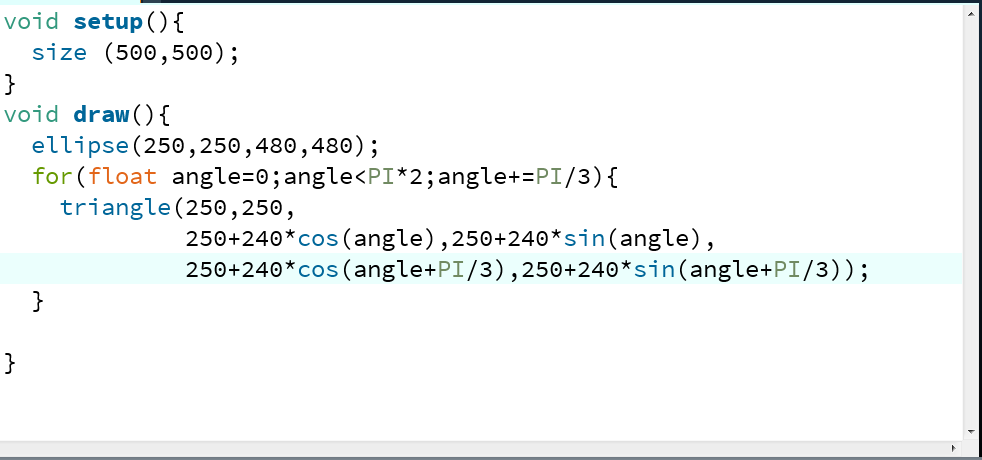
目標:畫出美麗圖形

First 1:先開啟程式畫出一個圓圈 (前兩個數字是圓心,後兩個是圓的直徑)


First2: 接著在利用三角形組出一個六角形


First3 :利用迴圈將半徑240改成R 畫出更多三角形

-------------------------------------------------------------------------------------------------------------------------
畫出很多很多圓形

利用迴圈將圓圈分為直排和橫排
 
-------------------------------------------------------------------------------------------------------------------------

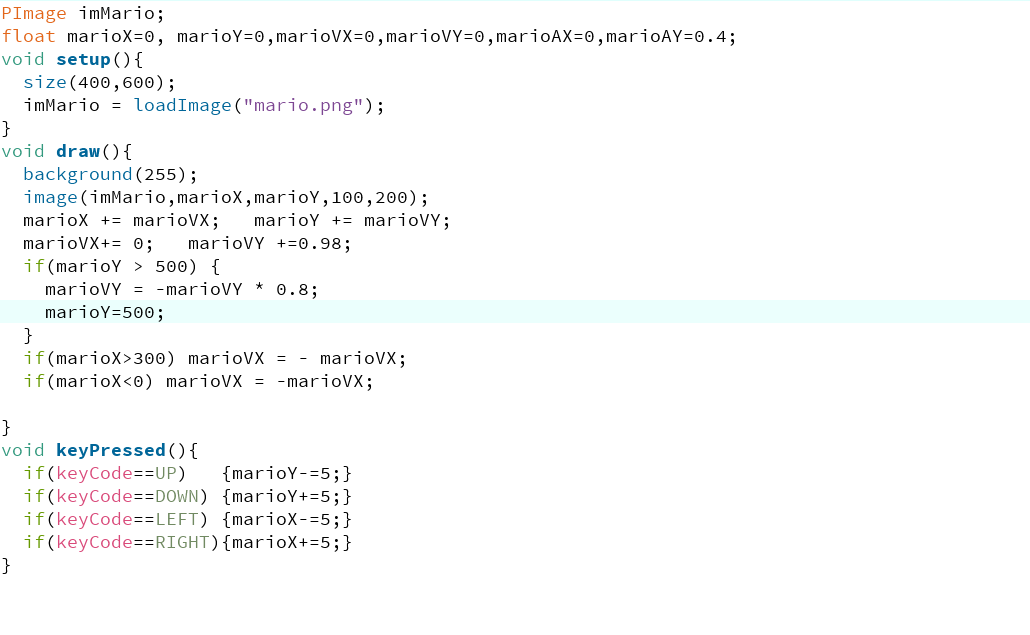
讓馬力歐移動跳躍~

先讓馬力歐能簡單的移動~

為了讓他的移動跟跳躍更自然 我們加上牛頓定理


並且讓他能再視窗彈來彈去


2018年9月20日 星期四

week 02 JN

WEEK 2 

目標1:寫出很噁心的接龍程式

首先先劃出一個圓形
--------------------------------------------------------------------------------------------------------------------------
接著再讓他從大變小 
--------------------------------------------------------------------------------------------------------------------------
接下來要讓圓圈變色,先使用色彩選擇器 了解HSB
--------------------------------------------------------------------------------------------------------------------------
了解之後便可以開始寫程式
--------------------------------------------------------------------------------------------------------------------------
因為上面圓圈的移動都是用滑鼠 我們改用CircleX CircleY來讓他亂跑
random(10) 的意思就是 1~10之間的亂數
--------------------------------------------------------------------------------------------------------------------------
因為random(10)的數字都是正的 所以會一直往左下角跑
所以我設成random(40)-20 這樣有正也有負 
所以才會四處亂跑
--------------------------------------------------------------------------------------------------------------------------
2.讀圖檔
下載完圖片後直接拉進去就好了
--------------------------------------------------------------------------------------------------------------------------
讓他跟著滑鼠移動

--------------------------------------------------------------------------------------------------------------------------
新增背景